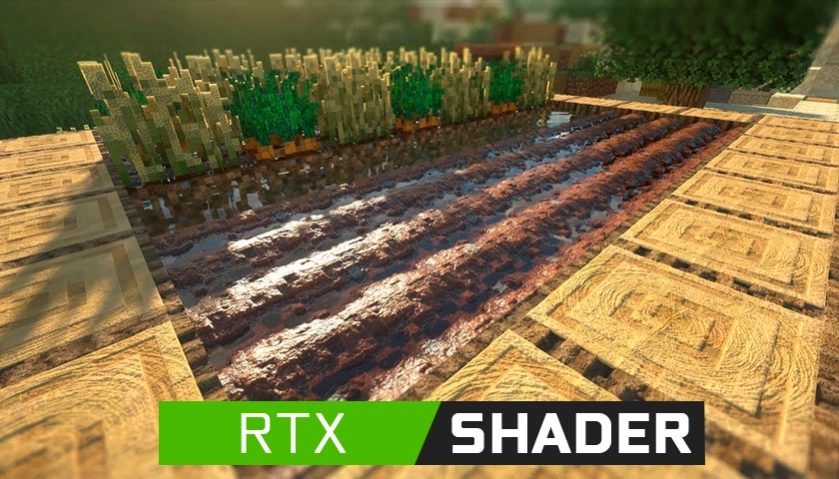
Minecraft RTX Shaders 2026: The Best Packs for Bedrock
Finding reliable ray tracing resource packs that work seamlessly with the latest RenderDragon engine updates is a frustrating challenge for many players. You need packs that deliver stunning visuals without crashing your game or dropping your frame rate to unplayable levels. This guide breaks down the absolute best Minecraft RTX shaders available for Bedrock Edition in 2026.
Minecraft with RTX completely transforms the game through path-traced lighting, physically based rendering (PBR), and volumetric fog. To experience this, you must run Minecraft for Windows 10/11 on a PC equipped with an NVIDIA RTX (or compatible AMD Radeon RX) graphics card. Standard mobile, Xbox, or PlayStation consoles cannot utilize these specific packs.
We tested dozens of community-created resource packs. Our selection criteria focused on three core areas: visual fidelity, performance impact, and compatibility with the current Bedrock version.
The Evaluation Criteria
When judging an RTX pack, you must look beyond just bright lights. A high-quality RTX resource pack relies heavily on its PBR textures.
Proper PBR utilizes a specific texture mapping system. The base color map dictates the standard look. The normal map provides simulated 3D depth to flat surfaces. The MER map (Metallic, Emissive, Roughness) controls how light interacts with the block. Packs that balance these three elements correctly provide the most realistic and visually pleasing experiences.
Performance is the second major factor. High-resolution textures require significant VRAM. If a pack uses 1024x textures across the board, your GPU will struggle. The best packs offer multiple resolution options to match your hardware capabilities.
Top Pick: Vanilla RTX by CubeIR
Vanilla RTX remains the gold standard for players who want to keep the original aesthetic of Minecraft while adding realistic lighting. This pack does not attempt to change the fundamental look of the game's blocks.
Instead, it meticulously applies PBR maps to every single vanilla texture. Cobblestone retains its classic pixel art style but now features distinct depth and shadows within its crevices. Ores glow naturally in dark caverns. The water surface accurately reflects the surrounding environment and the sky.
Vanilla RTX is exceptionally well-optimized. Because it relies on the standard 16x resolution textures, it consumes minimal VRAM. This makes it the perfect choice for players running entry-level ray tracing cards like the RTX 3050 or RTX 4060.
Always choose Vanilla RTX if you play on large multiplayer servers where performance and framerate stability are your top priorities.
Best for Performance: Kelly's RTX
Kelly's RTX is legendary within the Bedrock Graphics community for its modular approach. It provides a fantastic baseline RTX experience but shines through its add-on system.
You start by installing the base pack. From there, you can layer specific modules to customize the aesthetic. Do you want glowing terracotta? There is an add-on for that. Do you prefer clear glass over vanilla glass? Just layer the clear glass add-on above the base pack.
This modularity gives you total control over the performance impact. Kelly's RTX also features some of the best water rendering currently available on the RenderDragon engine. The transition between above-water and underwater visuals is seamless, avoiding the harsh lighting breaks common in lesser packs.
Best Photorealism: JG RTX
If you have high-end hardware and want to push your system to its absolute limits, JG RTX is the answer. This pack completely abandons the vanilla aesthetic in favor of high-resolution, hyper-realistic textures.
JG RTX is available in multiple resolutions, up to 1024x. The normal maps in this pack are aggressively detailed. Brick walls look distinctly three-dimensional. Wooden planks show individual grain lines and subtle warping. The emissive textures on redstone lamps and sea lanterns are calibrated perfectly to avoid blowing out the surrounding environment with overly harsh light.
Be warned: running JG RTX at its highest resolution requires a serious GPU. You will need an RTX 4080 or better to maintain a stable 60 FPS at 1440p resolution.
How to Install RTX Shaders on Bedrock
Installing RTX resource packs on Minecraft for Windows is straightforward. Follow these exact steps to ensure the PBR textures load correctly.
- Download your chosen RTX pack. It will arrive as a
.mcpackfile. - Double-click the
.mcpackfile. Minecraft will automatically launch and begin the import process. - Wait for the "Import Successful" message at the top of the screen.
- Navigate to Settings > Global Resources.
- Click My Packs, select your new RTX pack, and click Activate.
- Move to the Active tab and ensure the RTX pack is at the top of the list.
Once activated, load into a world. Open your video settings and ensure the Ray Tracing toggle is flipped on. You can also adjust the ray tracing render distance in this menu to balance visuals and performance.
Troubleshooting Common Issues
Sometimes, RTX packs do not load correctly due to engine quirks or overlapping resources.
If you see completely black blocks or missing textures, you likely have a conflicting texture pack active. Go to your Global Resources and deactivate any other texture packs. RTX packs require exclusive control over the game's texture mapping.
If the Ray Tracing toggle in your settings is greyed out, Minecraft is not detecting compatible hardware. Verify that your Windows installation is fully updated and that you are running the latest NVIDIA Game Ready drivers.
Maximizing Your RTX Experience
Choosing the right pack is only the first step. To get the most out of your RTX experience in 2026, you must utilize DLSS (Deep Learning Super Sampling) or FSR (FidelityFX Super Resolution), which are built directly into Bedrock's video settings under the "Upscaling" toggle.
Ray tracing is incredibly demanding. Upscaling allows your GPU to render the game at a lower internal resolution and then intelligently upscale the image to your monitor's native resolution. This can easily double your framerate with almost no noticeable loss in visual quality. Always keep upscaling enabled when using an RTX resource pack.
Upgrading your game with path-traced lighting completely changes how you explore and build. By selecting Vanilla RTX for classic gameplay, Kelly's RTX for custom performance, or JG RTX for stunning realism, you ensure your Bedrock Edition looks spectacular. Download your preferred pack, apply it to your Global Resources, and experience the definitive version of Minecraft graphics today.